Local Google Fonts helps your Joomla website serve Google Fonts from your own site. It detects Google Fonts used by the frontend, downloads the stylesheets and font files, and rewrites supported references to local copies. This reduces the browser's need to connect to Google's font servers and gives you control over how fonts are stored and served.
Automatic Google Fonts localization
- Detects Google Fonts references in rendered pages and Joomla web assets.
- Finds Google Fonts in linked local CSS files and supported
@importrules. - Downloads Google Fonts CSS and font files, then serves the localized assets from your Joomla site.
- Processes localized Google stylesheets asynchronously and removes localized Google font preloads.
- Can remove
preconnectanddns-prefetchhints for Google's font hosts while localization is active.
Settings at a glance
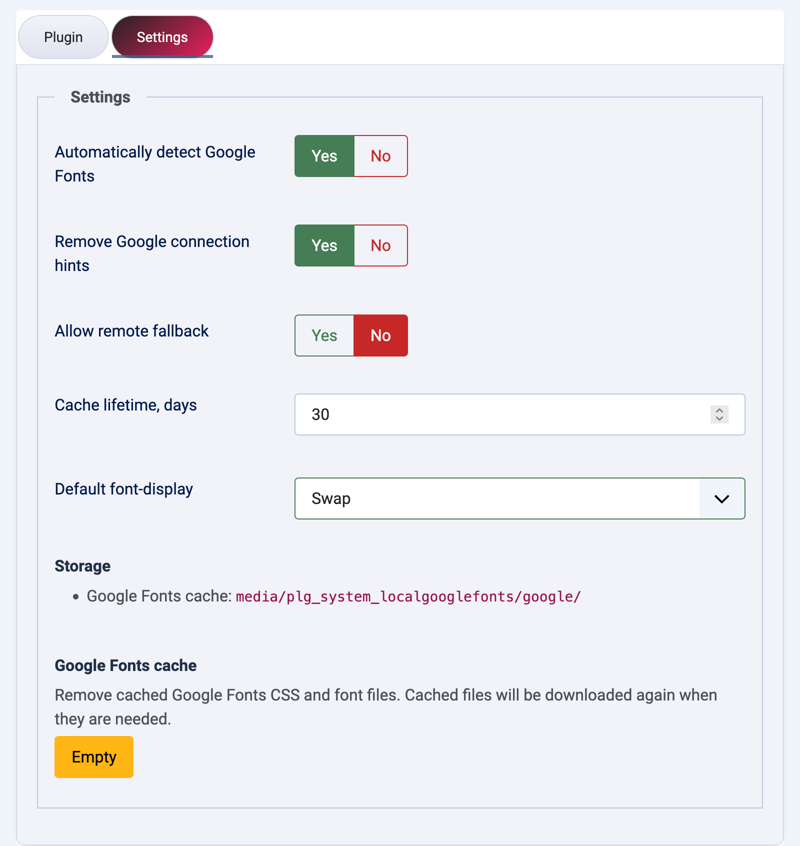
- Automatically detect Google Fonts: turn automatic detection and localization on or off.
- Remove Google connection hints: remove Google Fonts preconnect and DNS-prefetch links when localization is active.
- Allow remote fallback: decide whether original Google URLs remain when a download fails.
- Cache lifetime: set the Google CSS and font refresh interval.
- Default font-display: choose
auto,block,swap,fallback, oroptionalfor uploaded local fonts. A font variant can use its own value. - Storage: Google Fonts cache files are stored in
media/plg_system_localgooglefonts/google/.
Empty the Google Fonts cache
In the plugin settings, find the Google Fonts cache option and click its Empty button to delete the cached Google Fonts CSS and font files. This clears the cache; it does not disable font localization or remove your uploaded local fonts. When a cached Google Font is needed again, the plugin downloads it again. Joomla displays a success or warning message after the action.
Local Google Fonts is designed to work automatically with minimal setup, while still offering controls for site owners who need to fine-tune font selection, storage, and loading behavior.
Download include: Local Google Fonts plugin.